
Streamlining collaboration for seamless site management
At Creative Ground, we aim to make your website management as efficient and secure as possible. To ensure our team can assist with updates, maintenance, and support, we require access to your Elementor-hosted website.
Follow the simple steps below to invite us to your Elementor team:
Step-by-Step Guide to Invite Creative Ground
1. Sign into your Elementor account
Visit https://my.elementor.com and log in using your Elementor credentials.
2. Select your website
Once logged in, navigate to your dashboard. Find the website you would like us to manage and click “Manage this website.”

3. Access the Team settings
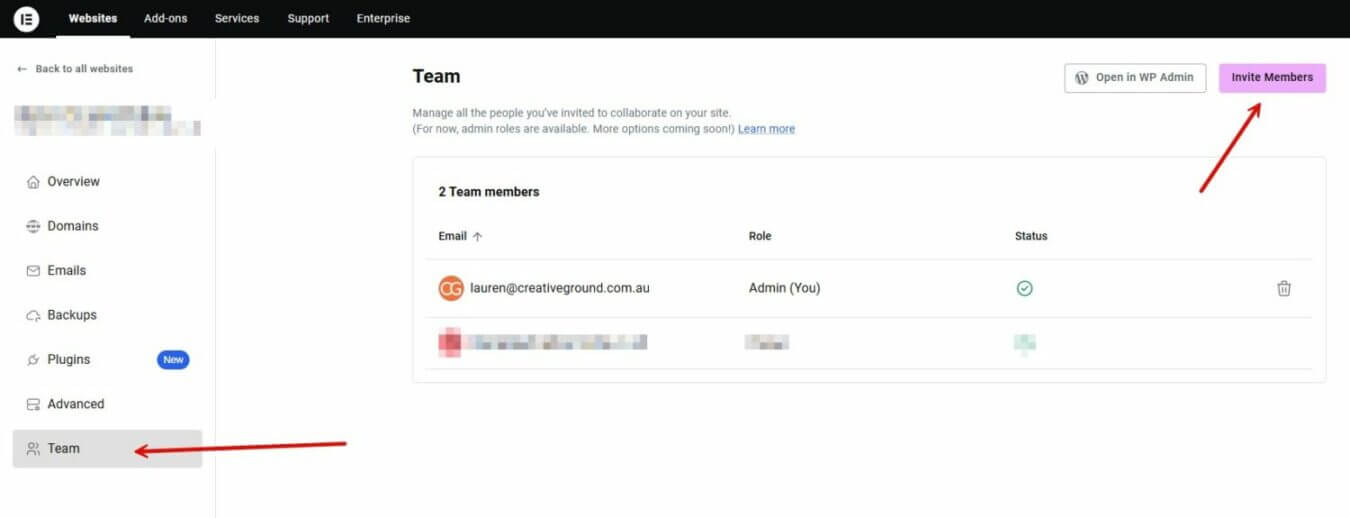
In the left-hand sidebar, select “Team” from the menu, then click on “Invite Members.”
4. Send the invitation
Enter the email address provided by Creative Ground and click the “Send invites” button.
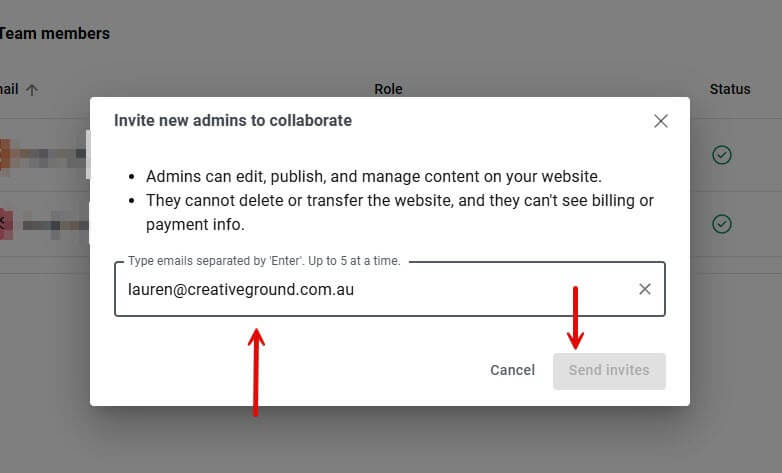
(Tip: Please double-check the email address to ensure accuracy before sending.)
Once you’ve sent the invitation, our team will accept it and begin assisting with your website as needed.
Need Help?
If you encounter any issues during this process, feel free to contact us at [email protected]. We’re here to help every step of the way.